


This resource outlines the technical infrastructure behind Qualified’s Google integration. Below, you’ll find specifications on the OAuth 2.0 authentication flow, Google Calendar subscriptions, and our strict data access policies to ensure your organization's data remains secure while syncing in real time.
OAuth 2.0 Authentication Flow
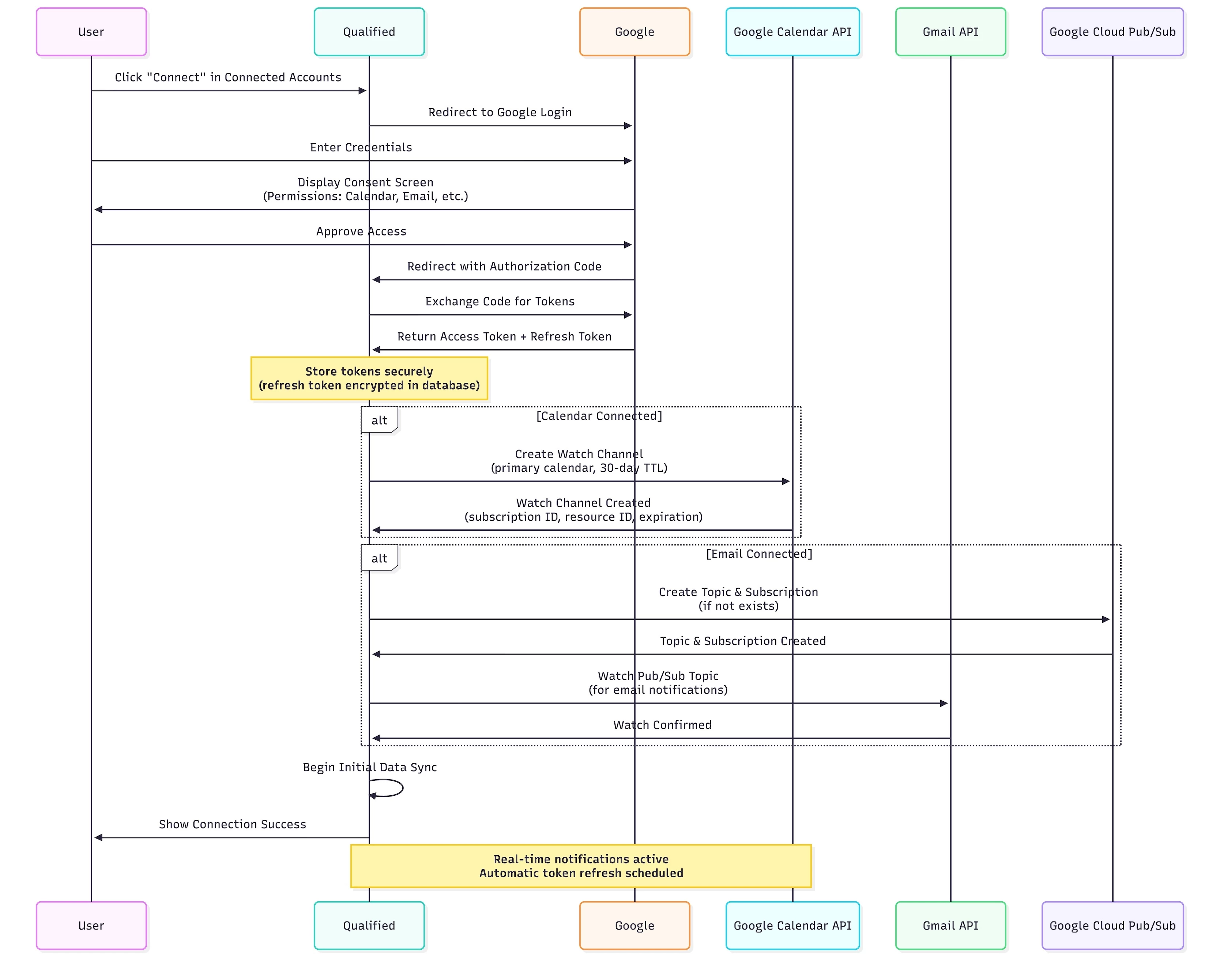
- User Initiates Connection
- User clicks "Connect" in the connected accounts section in Qualified
- Qualified redirects to Google login
- Google Authentication & Consent
- User authenticates with Google credentials
- Google displays consent screen showing requested permissions
- User approves access to calendar and/or email data
- Authorization & Token Exchange
- Google redirects back to Qualified with authorization code
- Qualified exchanges authorization code for access tokens
- Tokens are securely stored:
- Access Token: Short-lived token for API requests
- Refresh Token: Long-lived token for obtaining new access tokens
- Token Expiration: Timestamp for when access token expires
- Connection Established
- For calendar: Creates Google Calendar watch channel for event notifications
- For email: Creates Gmail Pub/Sub subscription for message notifications
- Initial data sync begins
- Connection Complete
- User sees confirmation in Qualified
- Calendar/email data begins syncing
- Real-time notifications are active
Google Calendar and Email Subscriptions
Qualified creates Google Calendar API watch channels and Gmail Pub/Sub subscriptions to receive real-time notifications about changes to your calendar and email data.
Calendar Subscription:
- Google Resource: primary calendar (user's calendar events)
- Change Types: created, updated, deleted
- Subscription Duration: ~30 days (auto-renewed via unwatch/rewatch)
- Notification Endpoint: Qualified servers
How it works:
- When you connect your Google calendar, we create a watch channel
- Google sends HTTP webhook notifications for any calendar event changes
- Watch channels are automatically renewed (unwatch + rewatch) to maintain real-time sync
- We use sync tokens to efficiently sync only what changed
- Watch channels monitor events from 1 week ago to up to 8+ weeks in the future (depending on your team's meeting scheduling window)
Email Subscription:
- Google Resource: Gmail messages (user's email messages)
- Change Types: created (new emails only)
- Subscription Duration: Gmail watch subscriptions (auto-renewed)
- Notification Endpoint: Qualified servers via Google Cloud Pub/Sub
How it works:
- When you connect your Google email, we create a Pub/Sub topic and subscription
- Gmail API watches the Pub/Sub topic and publishes notifications when inbox changes
- Pub/Sub delivers push notifications to Qualified's webhook endpoint
- We use efficient message processing to sync only new messages
- Subscriptions are automatically renewed to maintain real-time processing
Google Permissions (OAuth Scopes)
Qualified requests specific Google API permissions based on which features you enable. During OAuth, Google will show you exactly what permissions are being requested.
Core Permissions (Always Requested):
- email: Read your email address
- profile: Read your basic profile information
- openid: Authenticate using OpenID Connect
Calendar Integration:
- calendar.events: Read and write calendar events
- View your calendar availability
- Create, update, and cancel calendar events
- Sync calendar data for scheduling
- calendar.events.freebusy: View free/busy information
- Check your calendar availability
- Used with restrictive calendar scopes feature
Email Integration:
- gmail.readonly: Read Gmail messages
- Access email messages and threads
- Read message content and metadata
- gmail.send: Send emails on your behalf
- Send emails from your account
- Send replies to conversations
Google Meet Integration:
- meetings.space.created: Create and manage Google Meet meetings
- Generate Google Meet meeting links
- Add Google Meet meetings to calendar events
- Update meeting details
Available Integration Combinations:
- Calendar only (If user connect their calendar)
- Calendar + Google Meet (if user connects their Google account with Meet enabled)
- Calendar + Email (If customer's org enables the Email features)
- Calendar + Email + Google Meet (If user connects their calendar, the customer's org has Email features enabled, and user connects their Google account with Meet enabled)
- Email only (If AI Profile connects for email features)
Note: You only grant the permissions needed if the features are available in the org and the user actively connects.
How Real-time Updates Work
Calendar:
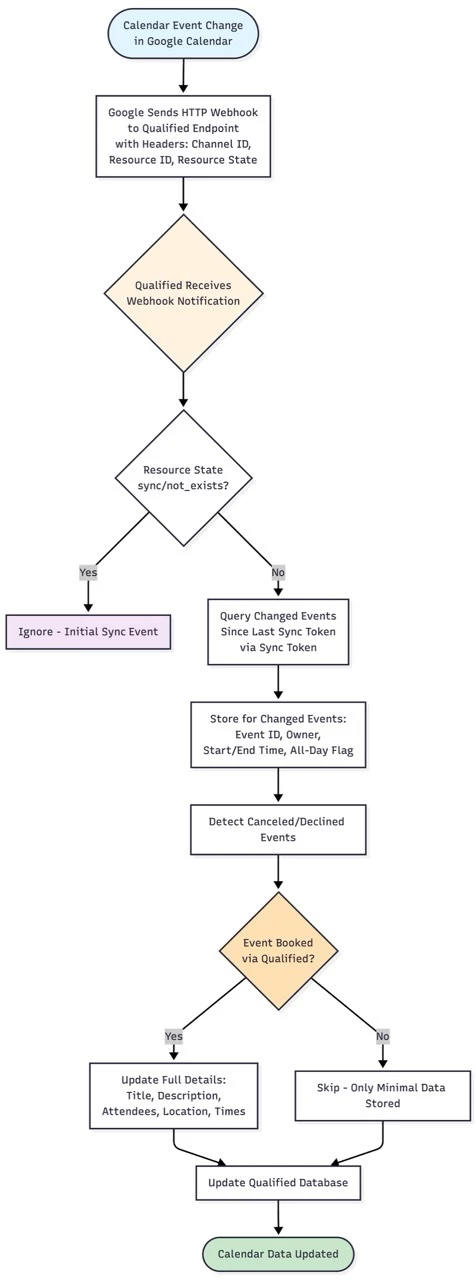
When a calendar event is created, updated, or deleted in Google Calendar:
- Google sends an HTTP webhook notification to Qualified's webhook endpoint
- Notification includes the subscription ID, calendar ID, and resource state in headers
- Qualified processes the notification and syncs the specific changes using sync tokens
- Your calendar data in Qualified is updated within seconds
Lifecycle Events:
- If Google requires reauthorization, we automatically handle the renewal
- If notifications are missed, we perform a full sync to catch up
- Watch channels are continuously maintained for uninterrupted service
- Subscriptions are automatically renewed (unwatch + rewatch) before expiration
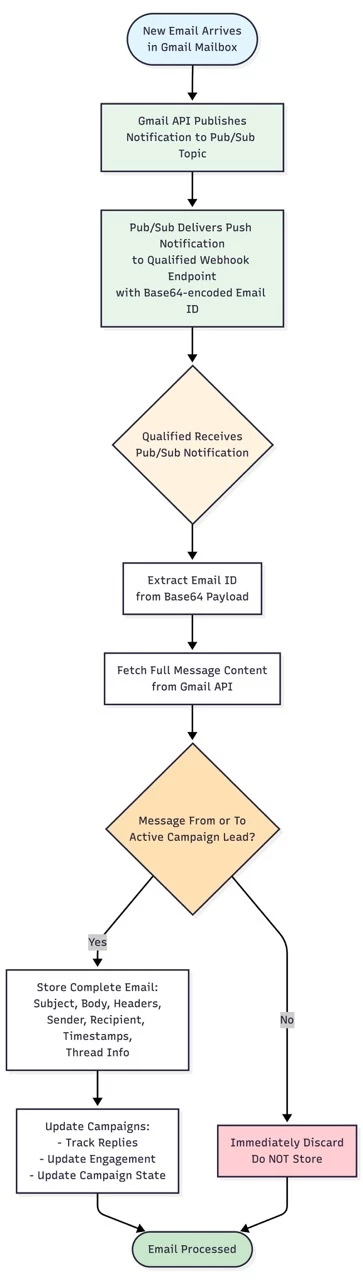
Email: When a new email arrives in your Gmail mailbox:
- Gmail API publishes a notification to Google Cloud Pub/Sub
- Pub/Sub delivers a push notification to Qualified's webhook endpoint
- Notification contains the email address in Base64-encoded format
- Qualified extracts the email ID and fetches the message content
- Email is analyzed for replies, conversations, and relevant data
- Your team sees updates in real-time
Benefits of Webhook-Based Sync:
- Near-instantaneous updates (typically within 1-3 seconds)
- Efficient: Only changed data is synced, not entire mailbox/calendar
- Reliable: Automatic retry and fallback mechanisms
Token Refresh and Credential Maintenance
Access Token Refresh:
Endpoint: Google OAuth 2.0 token endpoint
- Access tokens expire and need periodic refresh
- Qualified automatically refreshes tokens using the refresh token
- This happens without user interaction
- Refresh occurs before tokens expire (15 minutes before expiration) to ensure uninterrupted service
- Tokens are also refreshed reactively when making API calls if they've expired
Proactive Credential Maintenance:
- Google refresh tokens can expire after 90 days of inactivity
- Qualified proactively refreshes credentials every 30 days or when credentials access is about to expire
- Ensures continuous access without requiring re-authentication
When Re-authentication is Required:
- If refresh fails (e.g., user revoked access, token invalidated)
- User will be notified to reconnect their Google account
Data Access & Security
What Data We Access:
Calendar:
When we receive a calendar change notification:
- For meetings NOT booked through Qualified:
- We only store: event ID, event owner (which team member), start time, end time, and all-day flag
- We DO NOT store: titles, descriptions, locations, attendee lists, or organizer information
- This minimal data is used solely for availability checking
- For meetings booked through Qualified:
- We store complete details: title, description, attendees and timing information
- This enables us to track and manage meetings you've scheduled via our platform
Email:
When we receive a new email notification:
- We make an API call to fetch the full message content
- Based on email address, we check if the email is related to a lead in an active campaign
- If the email is NOT related to any of your campaigns:
- We immediately discard the message without storing it
- If the email is TO or FROM a lead in your campaigns:
- We store: subject, body, headers, sender, recipient, timestamps, thread info
- This allows us to track replies, engagement, and update campaign states
Security Measures:
- Access tokens and Refresh tokens are persisted in our Postgres database
- Refresh tokens are long lived and therefore are encrypted before being persisted
- API communications use HTTPS/TLS encryption
- Access tokens are short-lived and automatically rotated
- Refresh tokens are securely stored and never exposed
Google Security Controls:
- OAuth 2.0 industry-standard authentication
- Granular permission scopes (only request what's needed)
- User must explicitly approve each permission
- Users can revoke access at any time via Google account settings
- Google Workspace admins can review and control OAuth applications
Disconnecting:
- Users can disconnect at any time from Qualified settings
- System will discard the credential and stop using it or refreshing access tokens
- Watch channel subscriptions are automatically removed
- Email webhook subscriptions are automatically removed
Data Retention:
- Calendar and email data retention follows the same policies described in the "Qualified Data Management Policy" document



.svg)


