


Mission Control - Email shows activity related to email campaigns conducted by Piper, the AI SDR agent. This is your source as a Qualified admin for all details related to AI Email activity.
Left panel navigation
The left panel allows you to filter the view to specific subsets of data. There are three primary views to select between:
- Overview: This view shows all email activity across all campaigns.
- Nurture: This view displays leads who are being worked as part of a nurture campaign.
- Named campaigns: You can select specific campaigns, which are subcategorized into Active, Testing, and Off (inactive).
Selecting a campaign view level from the left panel opens a panel with detailed information about that campaign including performance metrics and worked leads.
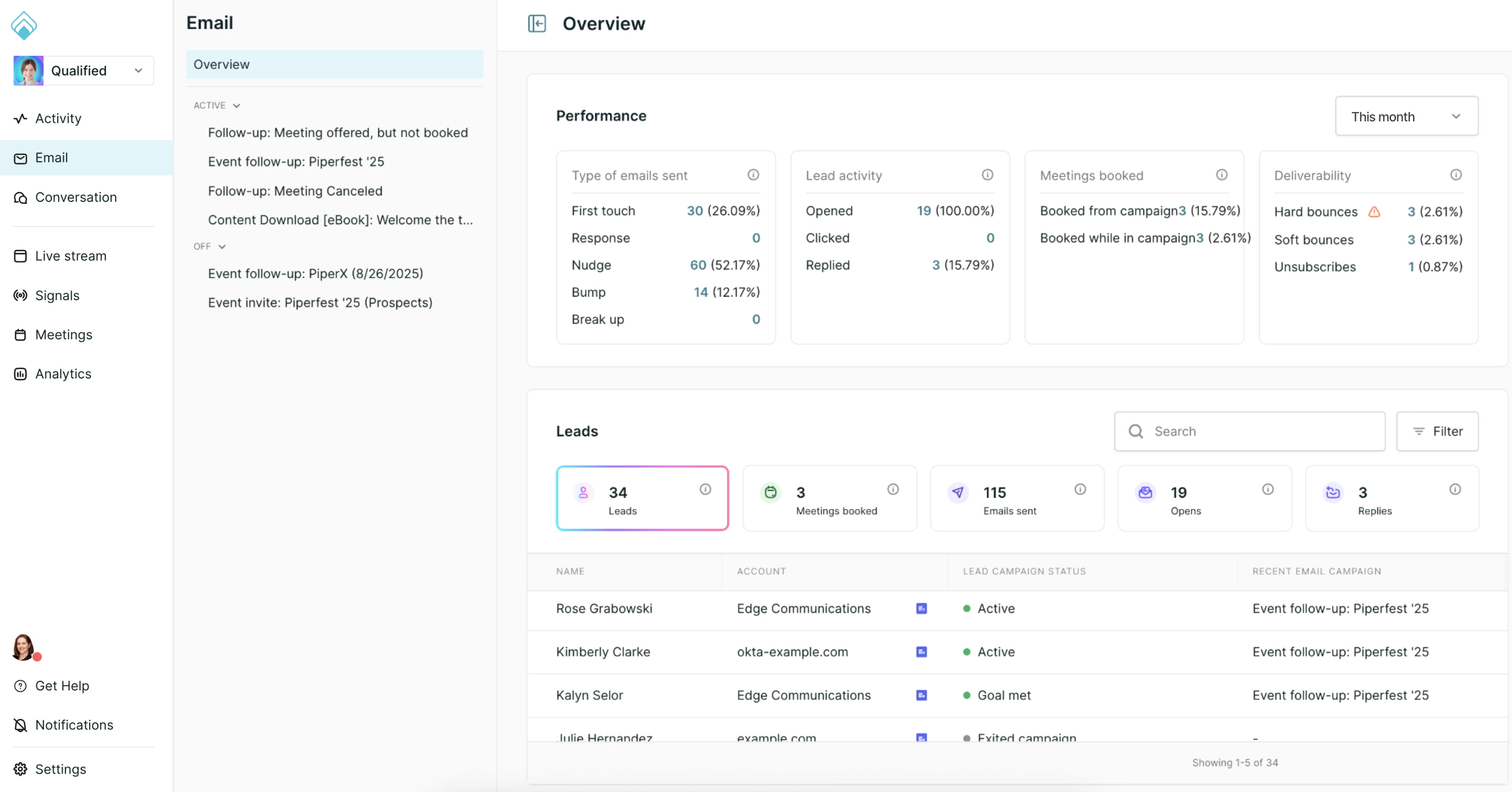
Campaign performance
Email campaign performance is grouped into four buckets of metrics, as follows:
Types of emails sent
This section provides a count of each specific email type sent by your AI SDR agent:
- First touch: The first email sent to a lead.
- Response: A reply to a lead’s reply to an email.
- Nudge: The second email sent to a lead.
- Bump: All emails sent between the nudge and the breakup.
- Breakup: The final email sent in a campaign.
Lead activity
You can view the following engagement metrics:
- Opened: The lead has opened an email.
- Clicked: The lead has clicked a link in the email.
- Replied: The lead has replied to the email
Meetings booked
Meeting metrics are broken down by:
- Booked from campaign: Meetings booked directly via the campaign.
- Booked while in campaign: Meetings booked while the lead was enrolled, but not directly attributed to the campaign link.
Deliverability
Email deliverability statistics, including:
- Hard bounces: permanent delivery failures
- Soft bounces: other delivery failures
- Unsubscribes: Leads who have opted out of receiving emails.
Records and filtering
The view includes a list of leads in a tabular format. Available columns include lead name, account name, account guide, all activity, and latest lead activity.
Clickable tiles
You can use clickable tiles to filter the lead list to records that meet specific criteria and display a count of leads. Tiles include leads, meetings booked, emails sent, opens, and replies.
List filter options
Additional list filter options are available in a side panel:
- Status: Active, exited, not enrolled, paused, or processing.
- Lead engagement: Opened, clicked, or replied.
- Meetings booked: From campaign or with campaign.
- Email deliverability: Delivered, soft bounce, hard bounce, or failed.
- Type of emails sent: First touch, response, nudge, bump, or breakup.
- Exit reason: Engagement window ended, campaign turned off, reply received, meeting booked, or visitor guidance.
Campaign settings
When viewing a campaign (named or nurture), clicking the Settings button in the upper right corner will open the campaign’s settings for editing.



.svg)


