


When a lead lands on your website, Qualified uses “fuzzy matching” logic to connect them to their corresponding account in Salesforce based on a shared domain. For example, if a visitor with the email test@example.com arrives on your site, or is reverse IP matched to example.com, Qualified matches that lead to the "Example" account in Salesforce.
By default, when multiple accounts share the same domain, Qualified breaks the tie by prioritizing the account with the most opportunities. If a tie still exists, it looks for the highest number of contacts, followed by the most recent update time.
Strict account matching gives you more control over this process. You set rules that decide which account a lead can match, so leads are routed to the correct account owner and mapped fields are pre-filled with the right values.
Key features
Strict account matching gives you three ways to customize your account matching logic:
-
Alternative website fields: You can specify alternative website fields in Salesforce to use during the domain matching process.
- Additional Salesforce criteria: You can add specific filters to narrow the pool of eligible accounts. For example, you might choose to only match to Salesforce accounts that do not have a "Customer" record type.
- Data comparison: You can compare live Qualified data against Salesforce data. For instance, you can set a rule to only match when the Salesforce account's country field exactly matches the country field of the lead in Qualified.
These rules narrow the pool of accounts a lead can match. Qualified matches the lead only to an account that meets every rule you define. If more than one account still qualifies, Qualified uses the tie-break order to choose between them.
Set up account matching rules
Note: If you don't see Account Matching Rules in your Salesforce integration settings, contact your Qualified Success Architect (QSA) to have it turned on for your organization.
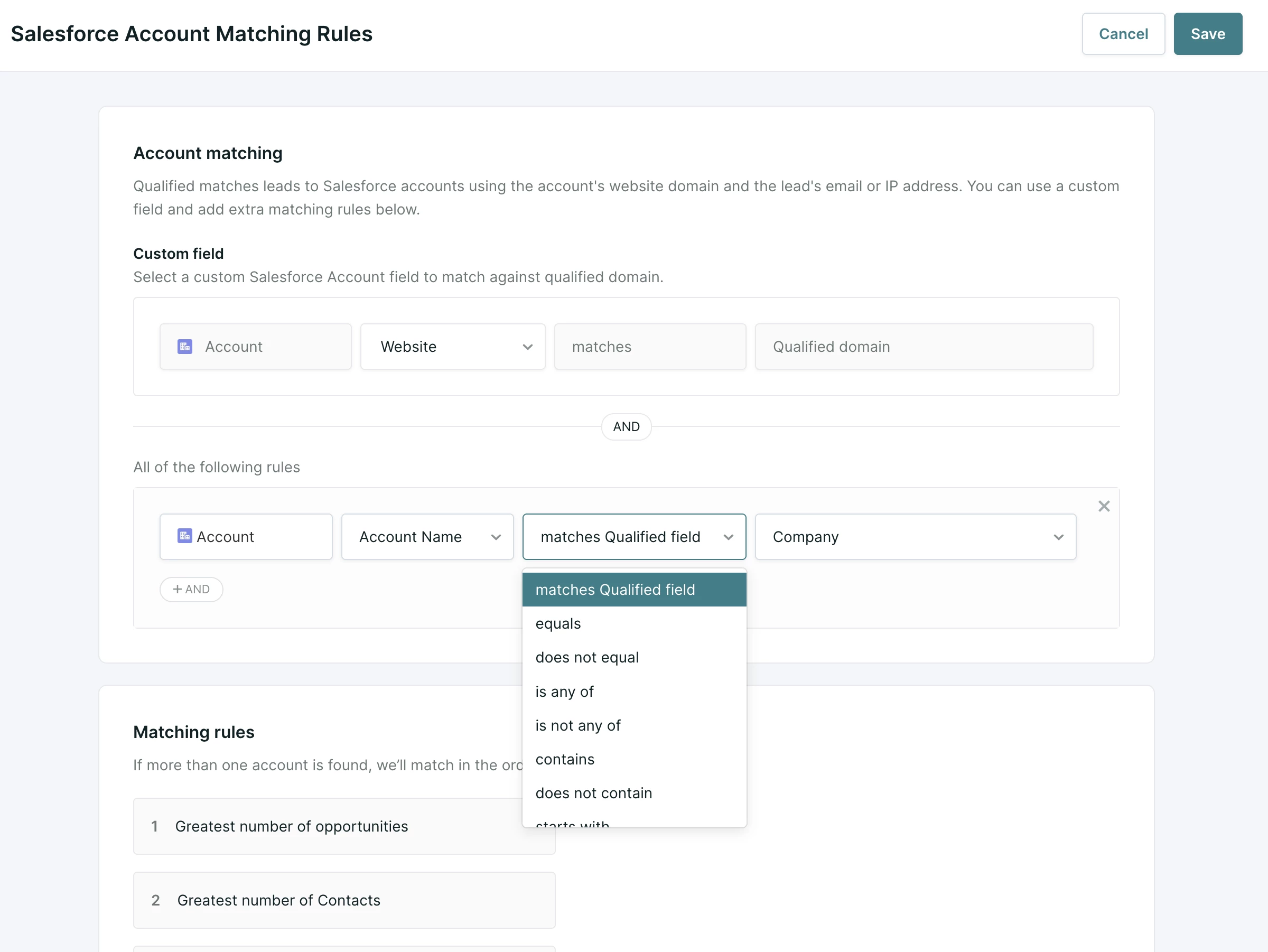
- Go to Settings → Integrations → Salesforce → Account Matching Rules.
- Under Custom field, choose the Salesforce Account field to match against the Qualified domain. Website is the default choice. If your organization stores the company domain in another field, choose that field instead.
- Click the + AND button to add an additional rule:
- Choose a Salesforce Account field.
- Choose an operator, such as contains, and enter the value to match.
- To compare the Salesforce field with a field in Qualified, choose matches Qualified field as the operator, then choose the Qualified field. For example, you can match the account’s country to the lead’s country in Qualified.
- To add another rule, select + AND. To remove a rule, select the X beside it.
- Review Matching rules, which shows the fixed tie-break order Qualified uses when more than one account meets your rules:
- Greatest number of opportunities
- Greatest number of Contacts
- Most recently updated
- Select Save.
If your rules use a Salesforce field that Qualified doesn’t already sync, Qualified syncs that field after you save. This usually takes a few minutes.
Implementation considerations
When configuring these rules, keep the following logic in mind:
- Restrictive logic: Matching filters are highly restrictive. A lead must meet all defined criteria to match an account. If you implement country matching and the data does not align perfectly, no match will be made, even if the domain is identical.
- Scope of matching: Strict account matching applies when Qualified matches leads to Salesforce accounts for pre-filling fields and routing. It doesn't change Qualified Signals or the Lead 360 Company fields, which remain internal identities within Qualified.
-
Known contacts: Your rules apply to fuzzy matching only. When Qualified matches a lead to an existing Salesforce contact by email address, the lead is matched to the account that contact belongs to.
-
Domain matching comes first: Qualified still starts by matching on domain, using the field you choose under Custom field. Your rules then narrow the accounts that share that domain. They can't swap domain matching for a different identifier, such as a tax ID.
-
One set of rules: Each organization has a single set of account matching rules, and it applies to every lead.



.svg)


