


Track AI Email performance by reviewing sent emails and key metrics like open rates, replies, and meetings booked. Use these insights to optimize engagement and refine your campaign strategy.
View emails sent
- Monitor sent emails:
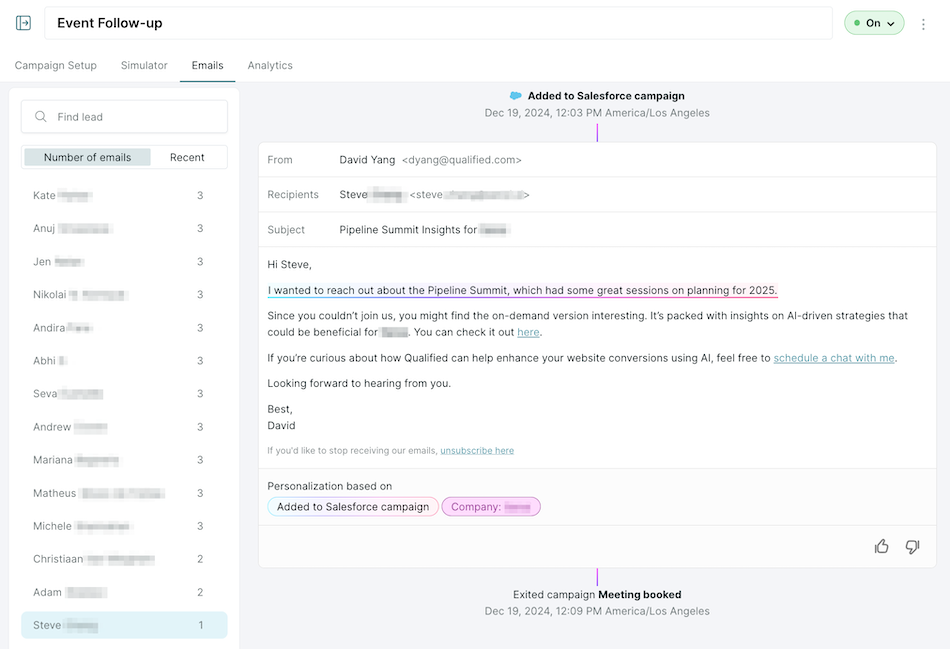
- Go to the Emails tab to see a list of all the leads that have received at least one email from the campaign.
- Click on the lead to view the email(s) that have been sent.
- Review details such as:
- Email copy
- Send time
- Recipient details
- Campaign exit activity
- Replies
- Adjust campaign setup and/or instructions, as necessary
- Confirm that email content aligns with campaign goals and that personalization is working as intended.
- Adjust the Campaign setup and/or Campaign instructions as necessary.
- Provide feedback (optional)
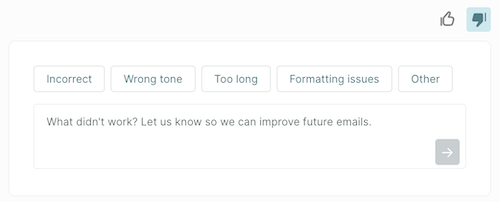
- Provide feedback on the generated email by using the 👍 or 👎 buttons at the bottom of the email.
- If you click the 👎 button, please categorize your feedback and provide additional information for our team to review.
Viewing campaign analytics
- Navigate to the Analytics section for the selected campaign.
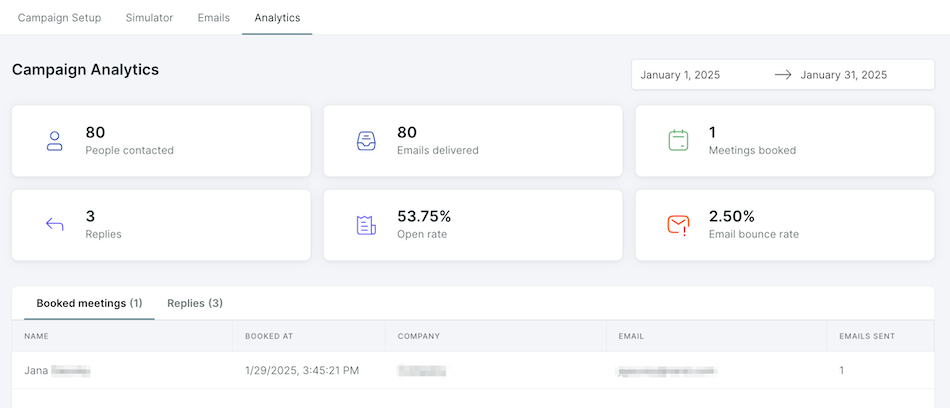
- Review performance data such as:
- Meetings booked: Leads who booked a meeting.
- Replies: Leads who have replied to the email.
- Open rates: Percentage of recipients who opened the email.
- Email bounce rate: Percentage of sent emails that failed to deliver.
- Optimize, as necessary:
- Use insights to adjust campaign triggers, campaign instructions, or promoted content to improve results.
Need to make some adjustments? Check out the following articles for guidance on Creating AI Email campaigns and Configuring promoted content.



.svg)


