


Qualified’s meeting routing allows you to connect high-intent website visitors directly with the right members of your team by leveraging your existing Salesforce data. By matching visitors to Salesforce records, your AI SDR agent can offer real-time meeting booking with the specific account owners or representatives assigned to that lead.
Salesforce matching logic
When a visitor provides their email address, your AI SDR agent initiates an enrichment process to determine if a record already exists in your Salesforce instance. The system looks for matches across three primary objects:
- Leads: An exact match based on the visitor’s email address. Since Leads are not yet converted, they do not have a direct Account association in Salesforce.
- Contacts: An exact match based on the email address. When a visitor matches a Contact, the system also identifies the associated Account.
- Accounts: If no direct Lead or Contact match is found, Qualified can use "fuzzy matching." This assumes an Account match based on the visitor’s company name or email domain.
Execution flow and owner validation
In a typical routing configuration, the system evaluates mapping rules from top to bottom. For example, a rule might first look for a Contact Owner; if no match is found, it will then look for an Account Owner via fuzzy matching.
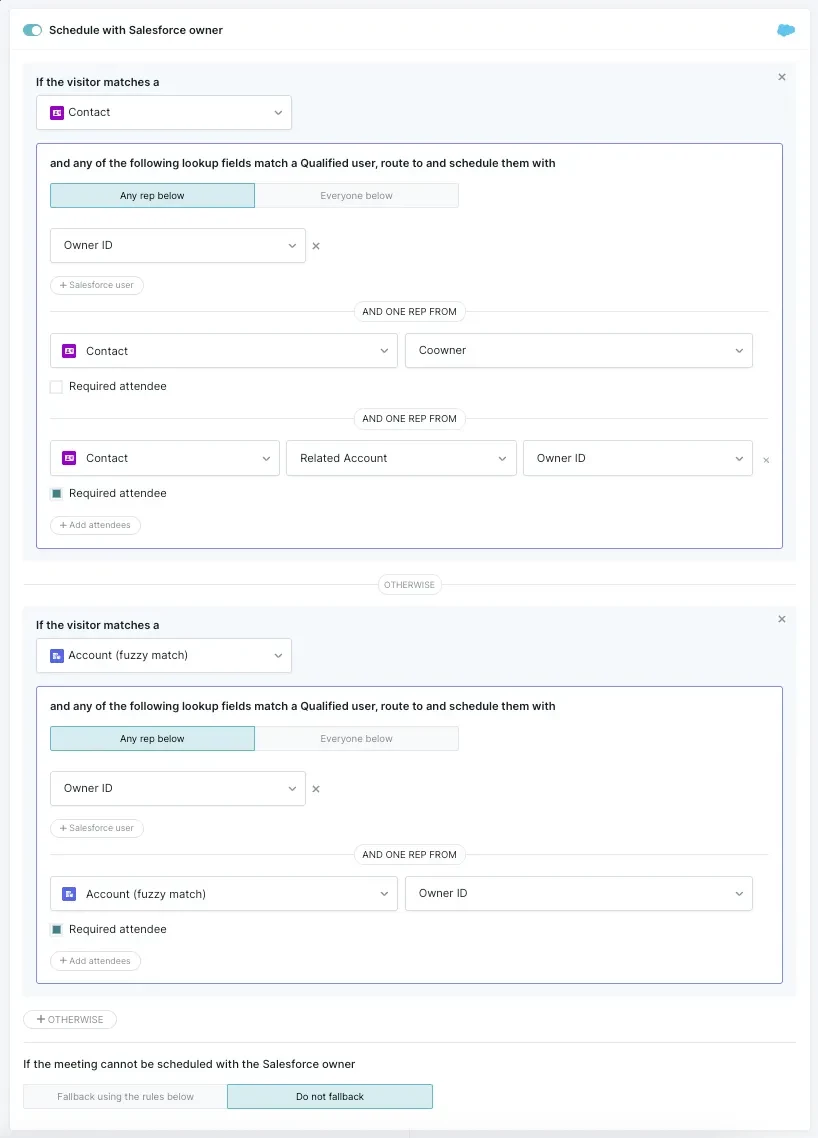
Once a Salesforce owner is identified by their ID, Qualified verifies the following:
- Connection: The user must have a personal Salesforce account connected within Qualified (Integrations → Salesforce → Connection).
- Credentials: The user must have valid calendar credentials connected.
- Availability: The user must have available time slots within the bookable window defined for that meeting type.
If the identified owner is unavailable or lacks the necessary credentials, the system moves to the next mapping rule or follows your Salesforce fallback setting.
Salesforce fallback
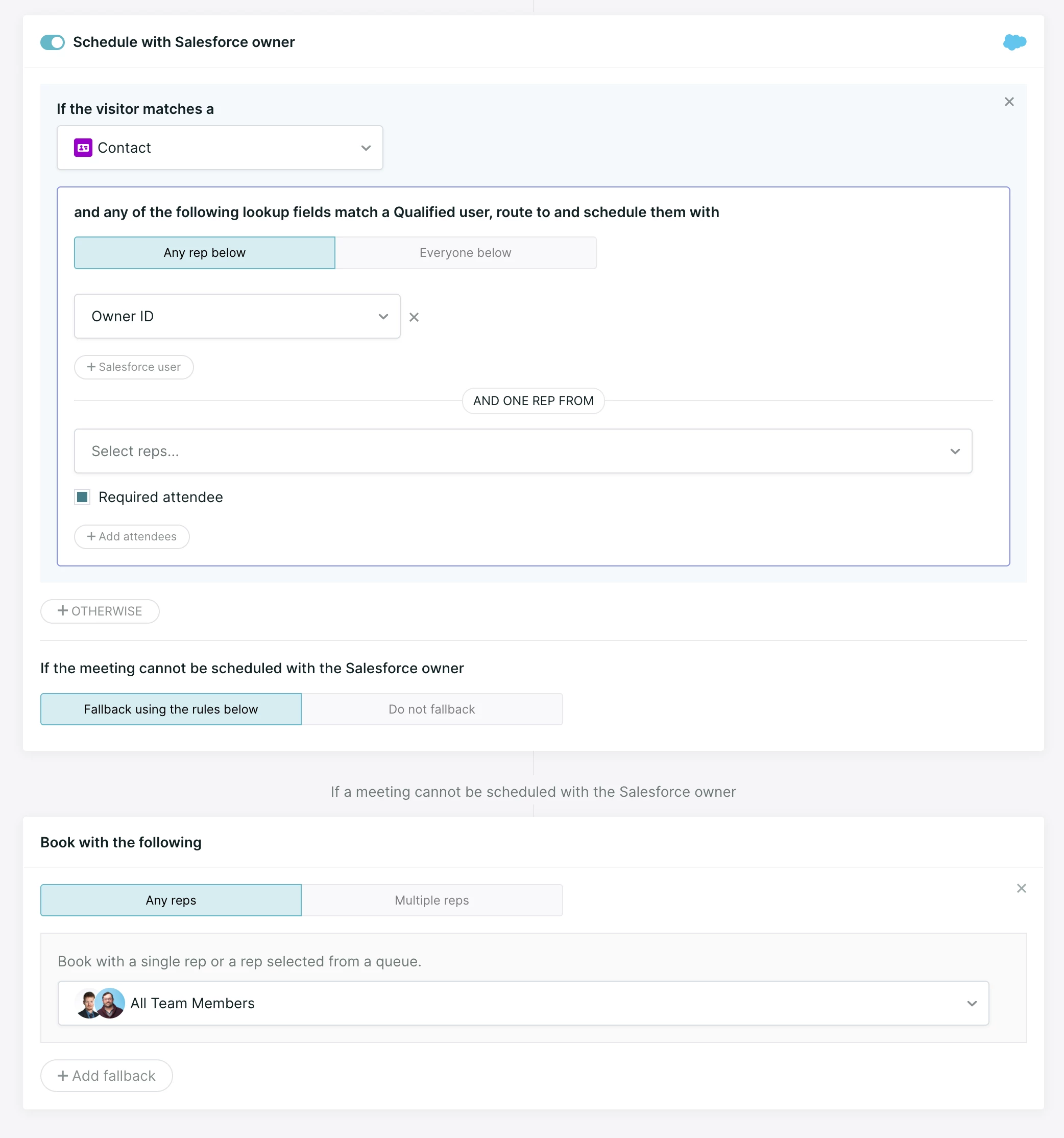
When a routing rule books with a Salesforce owner, the Salesforce fallback setting decides what happens if that owner can't take the meeting. There are two options.
- Fallback using rules below: If the system can't book the owner, or can't find the owner in Qualified, it moves on to your Book with the following destinations, if you've set any up.
- Do not fallback: If the system finds the owner in Qualified but can't book them, the meeting doesn't move to a fallback. This covers a busy calendar, no bookable hours, or disconnected calendar credentials. The visitor sees a message that no times are available.
Note: Do not fallback applies only when the owner is found in Qualified. If no Qualified user is connected to that Salesforce owner, the system moves on to Book with the following even when Do not fallback is selected.
Account team member routing
If enabled, Qualified can route direct contact matches via an account team member role. With this enhancement, ATM routing options are fully extended to the Contact direct match path. This allows your routing experiences to branch dynamically based on specific Account Team Member roles, ensuring a seamless handoff to the correct internal team members when a known Contact arrives on your website.
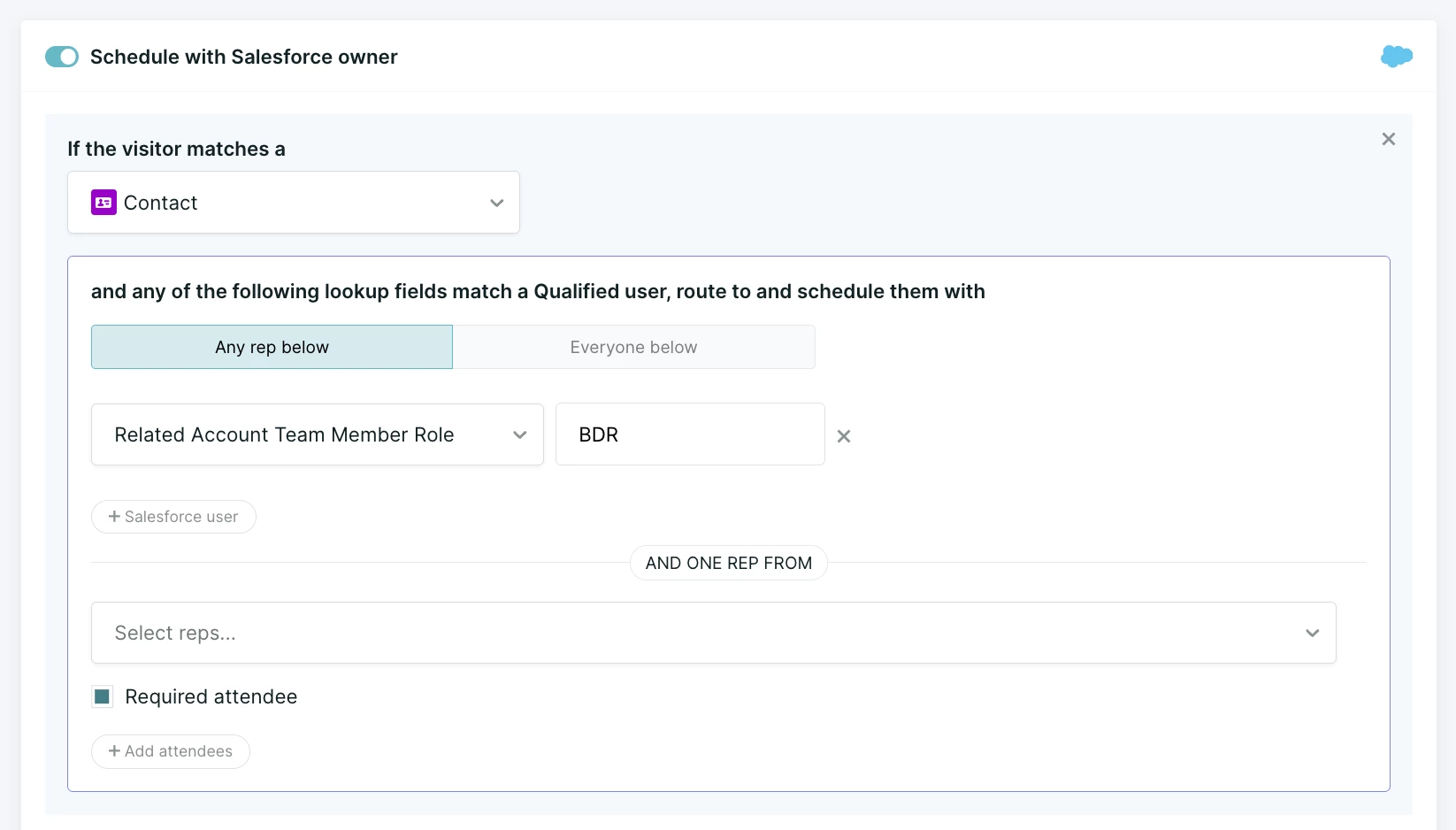
Account Team Member routing is disabled by default. To have this option enabled for your organization, please contact your Qualified Success Architect.
Advanced routing options
When configuring your routing destinations, you have several ways to manage how reps are selected:
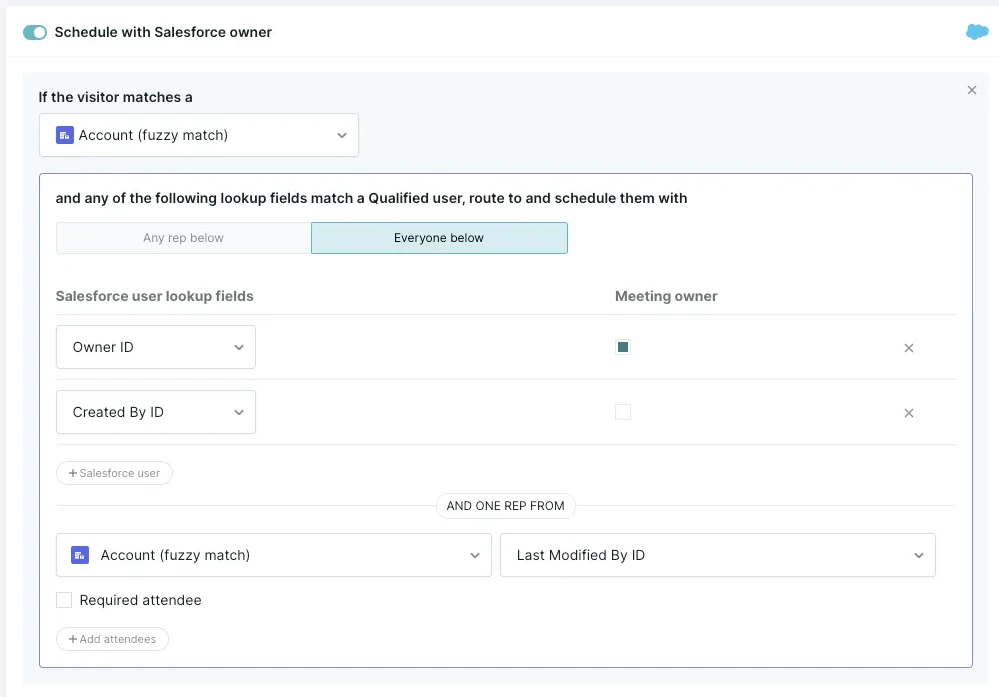
- Any rep below: The system checks the fields in order (e.g., Owner ID, then Created By ID). It selects the first valid and available owner it finds.
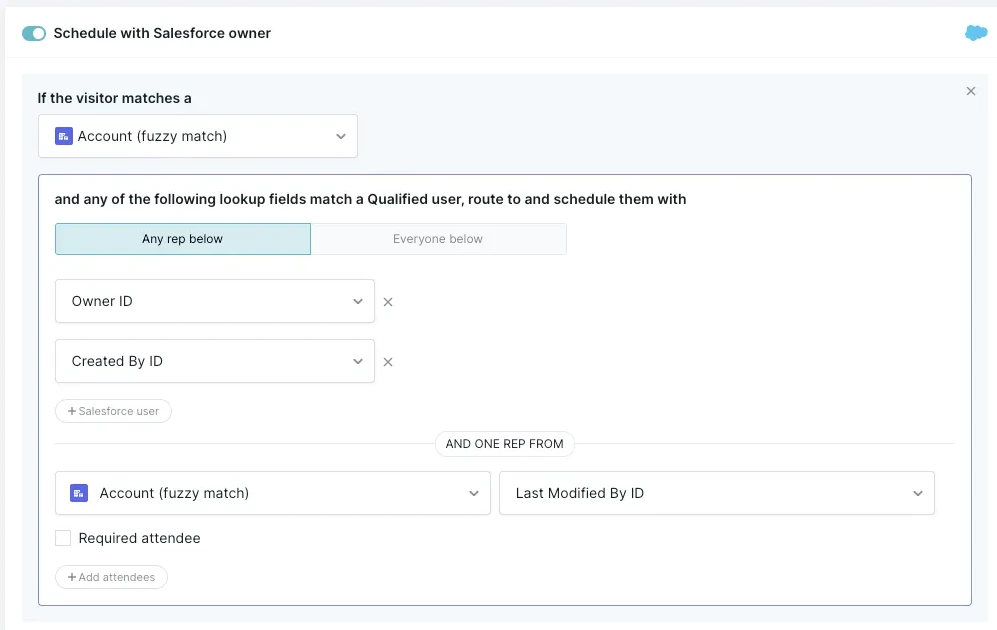
- Everyone below: The system attempts to book a meeting involving all mapped owners. For this to be valid, every user mapped must have at least one available time slot.
- Book with the following: This is the final attempt in your routing rules. It holds up to four destinations: the first destination, plus up to three more added with Add fallback. Each destination can be a specific rep or a meeting queue. The system tries them in order until it finds an available rep.
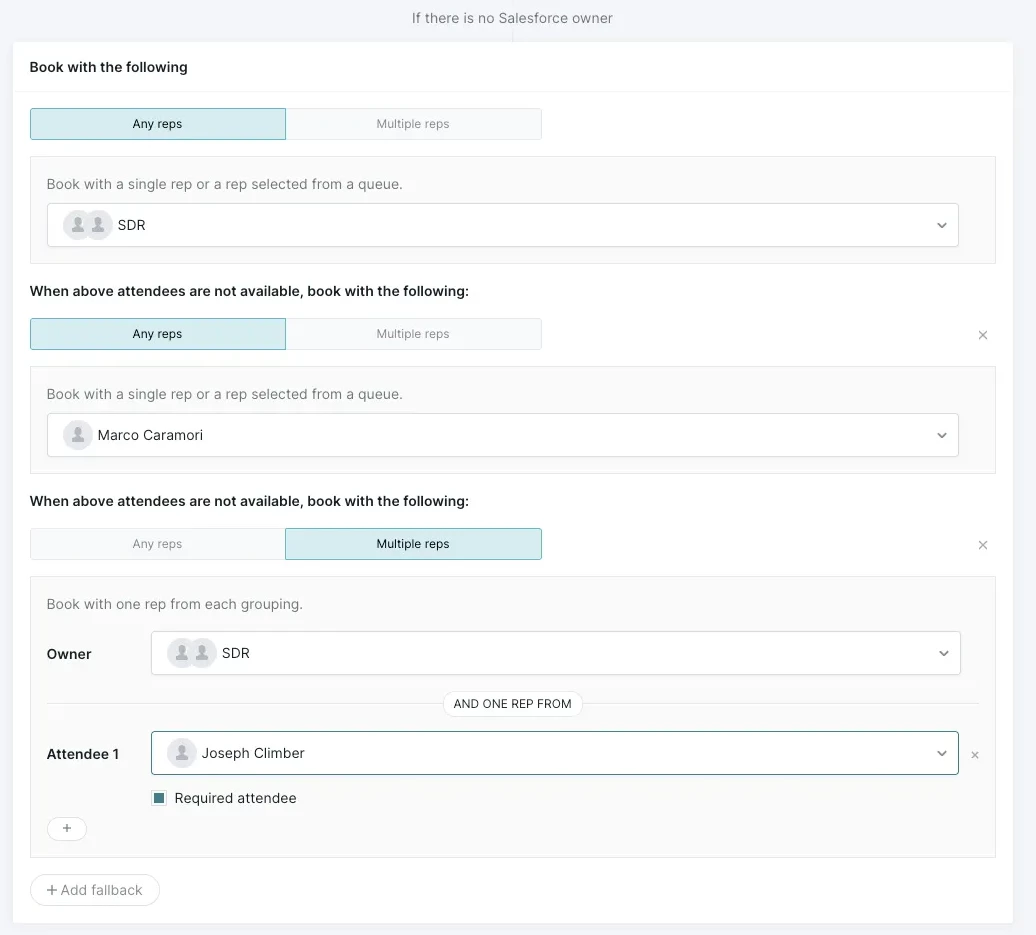
Note: Absence handling doesn't carry over to fallback destinations. When reps in an earlier destination are busy or unavailable, the system moves on to the next destination. It doesn't use reps from a later destination to cover an absent rep's time.
Optional attendees behavior
Optional attendees provide flexibility for group meetings without restricting the availability of the primary meeting owner. When you select Multiple reps for a destination, or as part of Salesforce routing, the meeting owner is a required attendee, and you can mark any additional attendees as optional.
- Availability: The system completely ignores the availability or calendar credentials of optional attendees. A meeting can be booked even if an optional attendee has no bookable hours or disconnected credentials.
- Calendar invites: These participants are marked as "Optional" in the calendar invitation. Because their attendance isn't required, the system continues to show those time slots as available for the optional rep, allowing them to be the primary owner for other meetings at the same time.
- Queues: If an optional attendee is selected from a meeting queue, the system will automatically select the first rep in that queue regardless of their specific availability.



.svg)


