


AI Email tracks the campaign emails Piper the AI SDR Agent sends. Opens, clicks, and the website visits that follow are reported back to you, so you can measure whether a campaign is working. This article covers what gets tracked, where that data appears, how to turn tracking off for a single campaign, and how to disable it for your whole organization when you need to meet consent requirements such as CNIL’s rules on open tracking.
What your AI SDR agent tracks in campaign emails
Campaign emails can carry three kinds of tracking. Each campaign has two settings that control them:
- Open tracking controls the open tracking pixel.
- Link tracking controls the Qualified identifier on links and the click tracking redirect.
Open tracking pixel
Your AI SDR agent adds a single 1×1 transparent image to the bottom of the email body, below your signature and the unsubscribe footer. It's hidden, so recipients don't see it.
When the recipient's email client loads that image, Qualified records an open for that email, along with the time and the email client that requested it. The image URL contains encoded Qualified identifiers for your organization and for that one email. It doesn't include the lead's name, email address, or any other recipient detail.
Opens are a best-effort signal. Recipients who block remote images won't register an open, and Qualified filters requests from known bots and security scanners so automated inbox scanning isn't counted as a human open. Open rates are useful as a trend, but they undercount.
Link parameters
Your AI SDR agent adds a Qualified identifier to the http and https links in the email body. Any URL parameters you configured on the campaign, such as UTM parameters, are added at the same time.
URL parameters are a separate campaign setting from link tracking, so they're still added when link tracking is off for a campaign.
The Qualified identifier is what connects a website visit back to the email that drove it, so the session, conversation, and Signals that follow are attributed to the campaign.
Links that aren't web addresses, such as mailto:, tel:, and anchors, are left alone.
Click tracking links
Your AI SDR agent rewrites eligible links in the email body so they pass through track.qualified.com. When the recipient clicks, Qualified records the click and redirects the recipient to the original destination. The visible link text stays the same.
Because the click is recorded at the redirect, it counts even when the destination page doesn't run the Qualified snippet. When the destination does run the snippet, the click and the visit that follows are counted once.
These links are rewritten:
- http and https links in the email body
- Meeting booking links in the email body
These links are left as they are:
- The unsubscribe link, so opting out never depends on a redirect
- mailto:, tel:, anchors, and anything else that isn't a web address
- Links in admin, preview, and test sends
Click tracking is on by default. To turn it off for a campaign, uncheck Link tracking in the campaign's settings. To turn it off for your whole organization, contact your Qualified Success Architect (QSA). See below for details on both options.
How clicks are counted
Qualified excludes these requests from click counts:
- HEAD requests, which mail clients and scanners use to check a link without opening it
- Requests with no user agent, or from known bots and security scanners
- Repeat clicks on the same link from the same IP address and user agent within 30 minutes, which count as one click
Security scanners can still register clicks, so click counts are best-effort, like opens.
Shared tracking domain
Tracked links and the open tracking pixel use the shared Qualified domain track.qualified.com. Your From address still uses your own sending domain, and spam filters evaluate the two domains separately.
Custom tracking domains aren't available.
Where tracked data appears
- The Email overview page reports opens and clicks across your campaigns.
- Each campaign's own pages report the same numbers for that campaign.
- Website visits from a campaign email are attributed to that campaign, so the session and any conversation that follows are tied back to the email.
When open tracking or link tracking is off for a campaign, that campaign's Opened or Clicked row shows a grayed-out dash in place of a percentage. Hover over it to see Open tracking disabled or Click tracking disabled. You can't select the row to filter. Meetings, Emails, Reply handling, and Unsubscribed are unaffected.
The Email overview page grays out Opened and Clicked only when tracking is disabled for your whole organization. Its totals can include campaigns that have tracking turned off.
Turning off tracking for a campaign
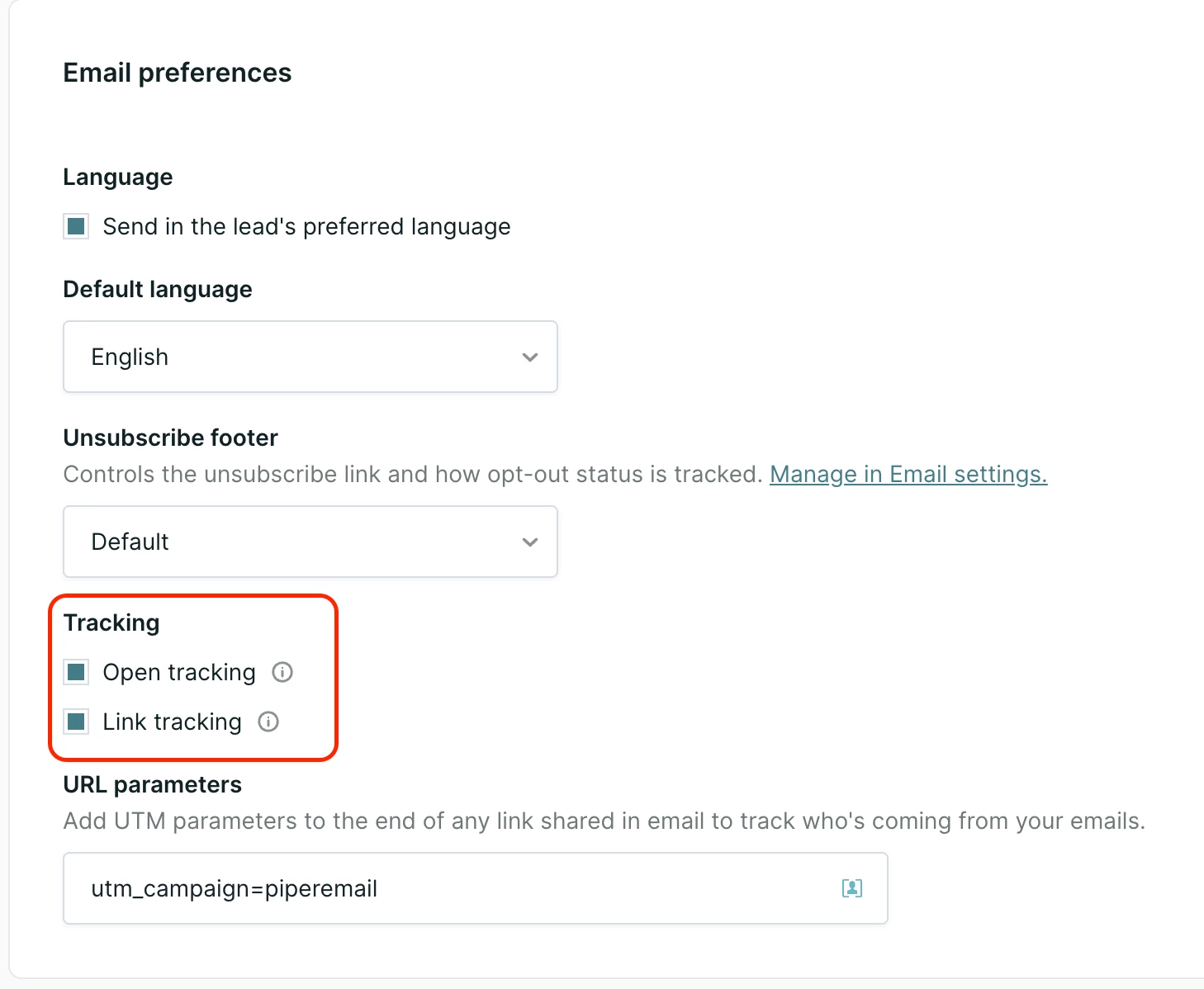
Open tracking and link tracking are set per campaign, and each works independently of the other. Both are on by default, so every campaign tracks as described above until you change it.
- Go to Email and open the desired campaign.
- Open the campaign's Settings, then select Settings in the sidebar.
- In the Tracking section, clear Open tracking, Link tracking, or both.
- Save the campaign.
What each setting controls
| Setting | On (default) | Off |
|---|---|---|
| Open tracking | Adds the tracking pixel so opens are recorded | New emails go out without the pixel, and opens aren't recorded |
| Link tracking | Rewrites and tags links so clicks are recorded and booked meetings are credited to the campaign | Links aren't rewritten or tagged, and clicks aren't recorded. Your campaign URL parameters, such as UTMs, are still added |
Note: With link tracking off, a meeting booked from a campaign email can't be traced back to the specific email. It still counts as influenced by the campaign while the lead is active in it.
Before you change a campaign's tracking
- Changes apply only to emails sent afterward.
- Emails already sent keep their pixel and tracked links.
- Tracked links in those emails keep working.
- The Opened and Clicked rows follow the campaign's current setting.
- Turning tracking off hides the opens or clicks already collected.
- Turning it back on shows them again. Rates may look low, because emails sent while tracking was off still count toward the total.
- Duplicating a campaign copies both tracking settings.
- Tracking can't be turned off for individual leads.
Disabling email tracking for your organization
Disabling email tracking for your organization turns it off for every AI Email campaign and every AI profile in your Qualified organization. It overrides the campaign settings.
Use this option when your organization has to stop tracking entirely, for example to meet CNIL requirements. Every new campaign starts with tracking turned on, so campaign settings alone can't keep tracking off across your program.
Steps to disable email tracking
- Contact your Qualified Success Architect (QSA) and ask to have email tracking disabled for your organization.
- Your QSA enables the setting for your Qualified organization.
- The change applies to emails generated from that point on. Emails already sent keep the tracking they were sent with.
The tracking pixel is a hidden image and isn't shown in email previews or anywhere else in the Qualified app. Since it only exists in the email as delivered, your QSA will confirm with you once the change is in place.
After the change, the Open tracking and Link tracking checkboxes in every campaign appear cleared and locked, with the message Email tracking is disabled for your team.
What changes when tracking is disabled
All three kinds of tracking stop at once:
- No open tracking pixel is added, so opens are no longer reported for new emails.
- No click tracking links are used, so clicks are no longer reported.
- No Qualified identifier is added to links, so website visits are no longer attributed to the campaign that drove them.
- Your campaign URL parameters stop being added as well. UTM parameters configured on the campaign are dropped along with the Qualified identifier.
Note: Dropping URL parameters is the one difference from turning off link tracking on a single campaign, which keeps them. If your own analytics depend on UTM parameters, expect them to disappear from campaign email links once tracking is disabled for your organization.
Opens and clicks are what AI Email reporting measures engagement with, so the Email overview page and your campaign pages will no longer show them. The rest of AI Email works as before:
- Emails are generated, sent, and delivered normally.
- The unsubscribe footer, unsubscribe link, and unsubscribe field updates all work.
- Meeting bookings, lead enrollment, and campaign exit triggers are unchanged.
- Deliverability and domain warming are unaffected.
Troubleshooting
- The Tracking checkboxes are cleared and can't be changed. Email tracking is disabled for your organization. To manage tracking per campaign instead, contact your QSA, and first check whether your organization needs tracking off for compliance.
- There's no Tracking section in campaign Settings. Contact your QSA.
- Opened or Clicked shows a dash. Tracking is off for that campaign or for your organization.
- A meeting isn't credited to a specific email. Link tracking is likely off for the campaign. The meeting still counts as influenced while the lead was active in the campaign.
- Links still carry UTM parameters with link tracking off. This is expected. URL parameters are a separate campaign setting.
- Opens or clicks still appear after tracking was turned off. They come from emails sent before the change, which still contain the pixel and tracked links.



.svg)


