


Email campaigns can share sending and handoffs across several people instead of routing everything to one person. You select a pool of Qualified users, groups, or both, and Piper rotates campaign activity across everyone eligible, which spreads outreach and reply workload across a team.
Before you begin
Round-robin behavior depends on how many eligible people your selection resolves to. Selecting a single user keeps the existing fixed-assignment behavior, so a pool needs at least two eligible people to rotate.
The requirements differ for sending and for handoffs:
- Senders need a connected mailbox, because they send email. A user without a valid mailbox connection cannot be selected.
- Handoff targets do not need a connected mailbox, because a handoff assigns ownership rather than sending anything.
Set up round-robin sending
- Open the campaign and go to its Setup page.
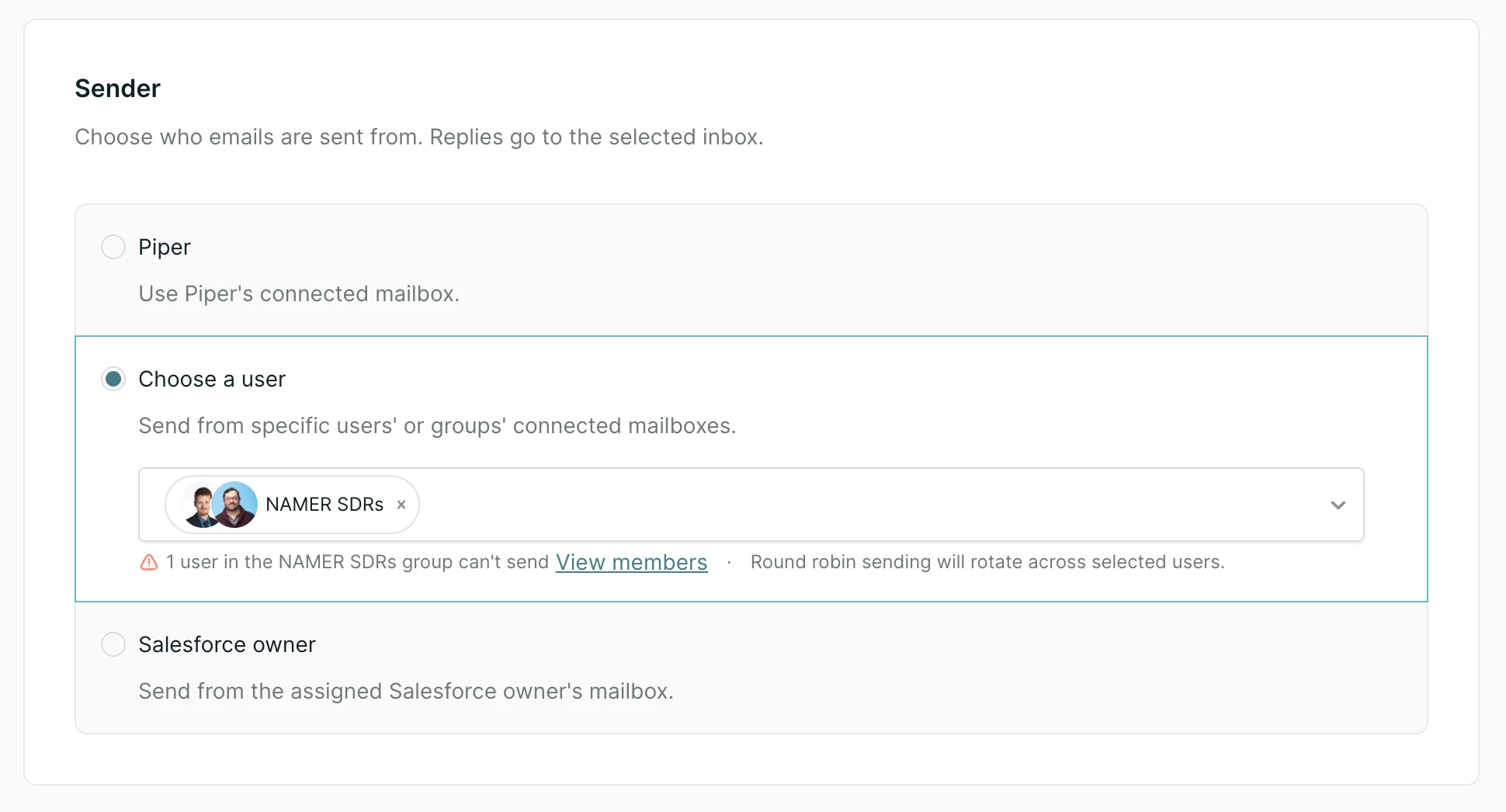
- Under Sender, select Choose a user.
- Select the users, the groups, or both that should send campaign emails.
- Save the campaign.
Once more than one eligible person is selected, new campaign emails rotate across them. The campaign confirms this with the message Round robin sending will rotate across selected users.
How the sender stays consistent
A sender is chosen when a lead enrolls in the campaign, and that person stays the sender for every email in that lead's enrollment. This keeps one name on the thread, so a lead who replies reaches the person who has been writing to them.
Changing the campaign's sender selection applies to leads who enroll afterward. Leads already enrolled keep the sender they were assigned.
Set up round-robin handoffs
Round-robin handoffs are available on campaigns that use AI-powered reply handling. That means either:
- The Agent sender type, or
- The Salesforce owner sender type with Send from Agent selected as the fallback
To configure one:
- Open the campaign and go to its Setup page.
- Select one of the AI-powered sender configurations above.
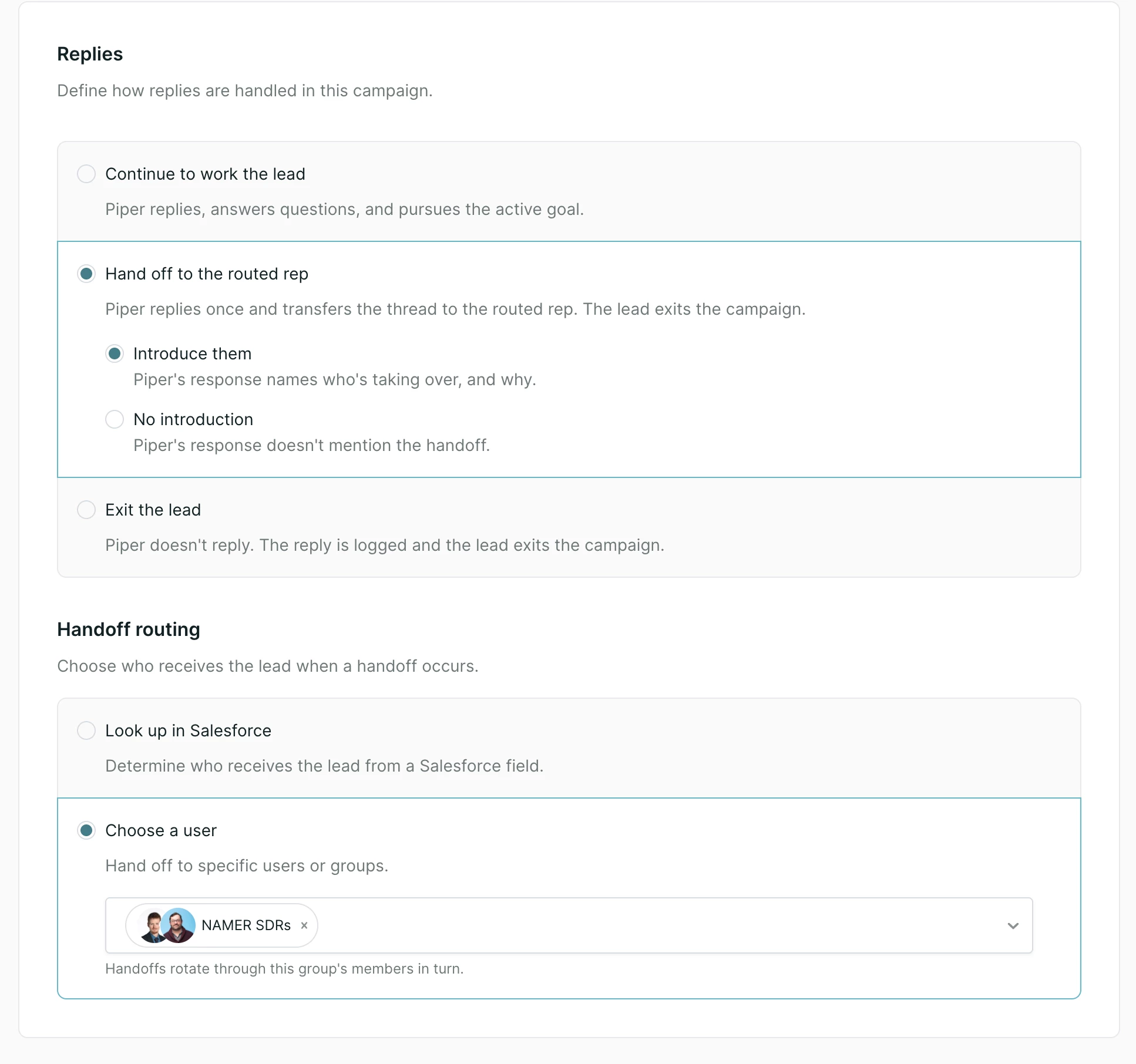
- Under Response handling, enable automatic replies.
- Under Handoff routing, select Choose a user.
- Select the users, the groups, or both that should receive handoffs.
- Save the campaign.
When your AI SDR agent determines that a lead should be handed off, Qualified selects the next eligible person from the pool and copies them on the response. The lead's campaign enrollment then ends.
Using groups
Groups are evaluated when the campaign runs rather than when you save it, so adding or removing a member changes who receives future sends and handoffs without any change to the campaign.
Because senders need a connected mailbox, group eligibility matters for sending:
- A group with no eligible senders cannot be selected for sending.
- Where some members can send and others cannot, Qualified shows a warning and links to the group's members so you can see who needs a mailbox connected.
Handoff routing has no such constraint, since handoff targets do not need a connected mailbox.
Things to know
Round-robin distributes sending and handoffs. It does not yet apply routing rules the way meeting and chat routing do, so it cannot route by attributes such as territory or role. Where you need that kind of split, a practical approach is to build separate campaigns and select the relevant group on each.
Note: The meeting link your AI SDR agent offers is not tied to sender selection, so the rep who is offered for a meeting can be someone other than the person sending the email.
Troubleshooting
- A user cannot be selected as a sender. Check that their mailbox is connected and the connection is valid. Senders require one.
- A group cannot be selected as a sender. Confirm the group contains at least one member with a valid connected mailbox.
- Rotation is not happening. Confirm the selection resolves to more than one eligible person. A single user behaves as a fixed sender or a fixed handoff destination.



.svg)


